Managing business finances is no longer limited to one office or one computer. Today, businesses want real-time data, fewer errors, and the freedom to work from anywhere. This is why cloud accounting software is shaping the future of business finance.
Instead of storing data on a single computer, cloud accounting keeps everything online.
What Is Cloud Accounting Software?
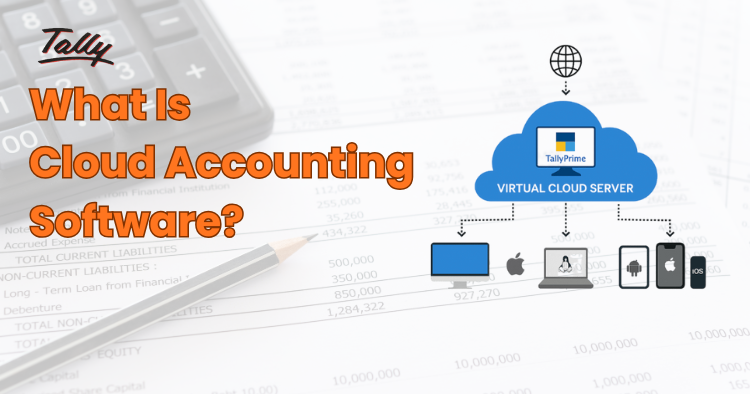
Cloud accounting software is an online accounting system where your financial data is stored securely on internet servers instead of your local computer.
You can log in using a browser or mobile app and access your accounts anytime. Your data updates automatically and stays backed up without manual effort.
Popular examples include cloud-based tools like Tally on Cloud, QuickBooks, and Zoho Books.
Best for
- Small and medium businesses
- Startups and freelancers
- Businesses with remote teams
- Companies working with global clients
Example
If you create an invoice using cloud accounting software:
- The invoice is saved online
- Income updates automatically
- Reports refresh instantly
- Your accountant can view it in real time
Note: You don’t need to send files or re-enter data.
How Cloud Accounting Works for Business Finance
Cloud accounting connects all financial activities into one system, such as invoices, expenses, bank transactions, and reports. When you record a transaction, every related record updates automatically in real time, so your accounts stay accurate and up to date without extra manual work.
It manages:
- Invoices: You can create, send, and track invoices online. The system updates your invoice automatically.
- Expenses:- Expenses can be recorded manually or imported from bank transactions.
- Bank Transactions:- Cloud accounting can connect to your bank account and sync transactions automatically.
- Taxes: Taxes like VAT are calculated automatically based on your transactions.
- Financial Reports: Reports such as profit and loss, cash flow, and balance sheets are updated in real time.
This real-time system helps businesses stay accurate and organized without extra effort.
Benefits of Using Cloud Accounting
Cloud accounting tools are designed for business owners, not just accountants. They focus on simplicity, automation, and clarity so businesses can manage finances without stress or technical complexity.
1. Automation & Time-Saving Benefits
Cloud accounting automates many daily accounting tasks that usually take hours when done manually.
With cloud accounting, you get:
- Automatic bank syncing
- Fewer manual entries
- Faster invoicing and expense tracking
- Instant report generation
This reduces errors and saves valuable time, allowing business owners to focus on growth instead of paperwork.
2. Reporting & Financial Insights
Clear financial data helps businesses make better decisions. Cloud accounting presents numbers in a simple and visual way.
Key reporting benefits include:
- Real-time profit and loss reports
- Cash-flow tracking
- Visual dashboards and charts
- Easy-to-understand summaries
Even non-accountants can quickly see how the business is performing.
3. Security & Data Backup
Keeping financial data safe is critical. Cloud accounting platforms use advanced security systems to protect business information.
Security features include:
- Encrypted data protection
- Automatic daily backups
- Secure login access
- Disaster recovery support
This greatly reduces the risk of data loss compared to local systems.
If these benefits sound useful for your business, switching to cloud accounting can be a simple way to reduce daily accounting stress and improve financial clarity.
Note: Many accounting professionals and SMEs globally are already shifting to cloud-based accounting systems to improve accuracy and efficiency.
Cloud Accounting Software vs Offline / Traditional Accounting – Which Works Better?
As businesses move toward remote work and flexible operations, accounting systems must also adapt. This is where cloud accounting software clearly outperforms offline and traditional accounting methods.
Cloud Accounting Software
Cloud accounting software lets businesses manage their finances online by storing financial data securely on the internet. This means business owners and accountants can access accounts, invoices, expenses, and reports from any location, whether they are in the office, at home, or travelling, as long as they have an internet connection.
Key advantages:
- Access from anywhere
- Automatic data backups
- Real-time collaboration
- Ideal for remote and hybrid teams
- Faster reporting with fewer errors
Additional benefits:
- Clean visual dashboards
- Real-time profit & loss tracking
- Easy cash-flow monitoring
Because of its simple design and live data, cloud accounting makes financial information easy to understand—even for non-finance users.
Traditional / Offline Accounting Systems
Traditional accounting systems usually run on a single computer and store data locally, which means access is limited to that device or office. They depend more on manual processes for data entry, updates, and backups, making them slower and harder to manage as a business grows.
Common limitations:
- Data stored on one system
- Limited user access
- Difficult team collaboration
- Slower updates
- Text-heavy, less visual reports
While these systems can be reliable, they lack the flexibility and speed modern businesses need.
Difference Between Cloud Accounting And Traditional Accounting
The table below helps us with a side-by-side comparison between cloud accounting and traditional accounting, discussing the factors and features provided by them.
| Feature | Cloud Accounting | Traditional Accounting |
| Payment Model | Subscription-based/ life-time | One-time license |
| Access | Anywhere (internet required) | Single device/location |
| Data Backup | Automatic | Manual or extra cost |
| Updates | Automatic | Paid & manual |
| Collaboration | Real-time, multi-user | Limited |
| Reporting | Visual & real-time | Text-heavy |
| Scalability | Easy as business grows | Limited |
| Maintenance | Included | Requires ongoing maintenance |
Cloud accounting clearly wins in flexibility, automation, and collaboration. This comparison shows that cloud accounting software offers more flexibility, automation, and real-time access than traditional accounting systems. For businesses planning to grow, work remotely, or reduce manual effort, cloud-based accounting systems provide a clear long-term advantage.
If your business is already using manual or offline accounting, this may be the right time to consider moving to a modern cloud accounting solution.
Benefits of Cloud Accounting for Nepali Businesses
Cloud accounting fits well with how Nepali businesses are evolving today. As more companies adopt digital tools and remote work, cloud accounting helps them manage finances smoothly without heavy systems or high upfront costs.
Cloud accounting is especially useful in Nepal because:
- Remote work is increasing
- Many businesses serve international clients
- Internet access is improving
- VAT invoices can be customised.
- No need for expensive servers
Even small businesses can use professional accounting tools.
Who Should Switch to Cloud Accounting Now in Nepal?
As more Nepali businesses grow beyond one office or start working with clients outside their city or country, managing accounts manually becomes difficult. Cloud accounting helps Nepali business owners stay organized, save time, and make better decisions without relying on paperwork or one computer.
Cloud accounting is ideal for Nepali businesses that:
- Want real-time financial data to track income, expenses, and cash flow
- Work with accountants or consultants remotely from Kathmandu, Pokhara, or other cities
- Have multiple staff handling sales, billing, or expenses
- Want fewer errors, less paperwork, and faster reporting
If this sounds like your business, switching to cloud accounting now can help you work smarter and stay competitive in Nepal’s growing digital economy.
Tips to Use Cloud Accounting Easily
Switching to cloud accounting is simple if you start the right way. These practical tips will help you use cloud accounting smoothly and avoid common mistakes, especially if you are new to digital accounting tools.
1. Choose the Right Software for Your Business
Not all cloud accounting tools are the same. Pick one that matches your business size, industry, and needs. For example, service businesses may need strong invoicing, while traders may need inventory tracking.
2. Start with Basic Features First
Do not try to use every feature on day one. Begin with invoicing, expense tracking, and bank syncing. Once you feel comfortable, you can slowly use advanced reports and automation.
3. Connect Your Bank Account Carefully
Link your bank account only after checking security settings. Bank syncing saves time, but it works best when reviewed regularly to avoid duplicate or incorrect entries.
4. Keep Your Data Organized from the Start
Create clear categories for income, expenses, and taxes. A clean setup at the beginning helps avoid confusion later and makes reporting much easier.
5. Work Closely with Your Accountant
Give your accountant access to your cloud accounting system. This allows them to review data in real time, correct issues early, and guide you properly.
6. Review Your Reports Regularly
Check profit, expenses, and cash flow at least once a week. Regular reviews help you spot problems early and make smarter business decisions.
7. Use Mobile Apps When Needed
Most cloud accounting tools offer mobile apps. These are helpful for sending invoices, recording expenses, or checking reports while traveling or working outside the office.
8. Train Your Team Briefly
If staff members handle billing or expenses, give them basic training. Even a short session helps reduce mistakes and keeps data accurate.
Quick Tip for Nepali Businesses
Always back up important documents like VAT bills and contracts, even when using cloud accounting. This extra step adds another layer of safety.
In Summary: Why Cloud Accounting Is the Future
Cloud accounting software is not just a passing trend; it is clearly the future of business finance. It gives businesses the flexibility to work from anywhere, the power of automation to reduce manual work, stronger security to protect financial data, and real-time insights that support better decision-making.
In simple terms, cloud accounting is smart, fast, and future-ready, while traditional accounting is slower, more manual, and limited to one location.
Businesses that adopt cloud accounting early gain a clear advantage by staying efficient, organized, and ahead of the competition.
As Nepali businesses continue to adopt digital tools, cloud accounting software is becoming a practical and future-ready choice. Starting early helps businesses stay organized, compliant, and prepared for growth.
If you are planning to modernize your accounting process, begin with a cloud accounting solution that fits your business size and work closely with an accountant familiar with cloud-based systems.
FAQs on Cloud Accounting Software
Is cloud accounting safe?
Yes. Most cloud accounting platforms use strong encryption, secure login systems, and automatic backups to protect data. In many cases, cloud systems are safer than local computers because they reduce the risk of data loss from hardware failure, theft, or accidents.
Can small businesses use cloud accounting?
Yes. Cloud accounting is ideal for small businesses because it is affordable, easy to use, and does not require technical skills. Small businesses can start with basic features and scale as their business grows.
Does cloud accounting need the internet all the time?
Yes, cloud accounting requires an internet connection to access data. However, mobile data can be used as a backup, and most Nepali businesses manage this easily with today’s improved internet and mobile networks.
Is cloud accounting expensive?
No. Cloud accounting usually costs less than hiring full-time accounting staff. The monthly subscription includes updates, backups, and support, which helps businesses control costs over time.
Can accountants use cloud accounting?
Yes. Accountants benefit from real-time access to financial data, faster reporting, and easier collaboration with clients. This allows them to focus more on advice and planning rather than manual data entry.
Is cloud accounting suitable for Nepali businesses?
Yes. Many Nepali startups, IT firms, travel agencies, and service-based businesses already use cloud accounting successfully. It supports remote work, online payments, and modern business needs, making it a strong fit for Nepal’s growing digital economy.
If you’re ready to move away from manual accounting, start with a cloud accounting solution that fits your business and consult a cloud-ready accountant for setup.